组件库的复用:
component组件的定义中可以放置插槽
1
2
3
4
5
6
7
8
9
10
11
12
| <template>
<el-row>
<el-col :span="24">
<div class="grid-content bg-purple-light">
<slot>
默认
</slot>
</div>
</el-col>
</el-row>
</template>
|
组件复用时引用需要import导入
1
| import ccc from '../../components/tem.vue'
|
export default里面需要配置
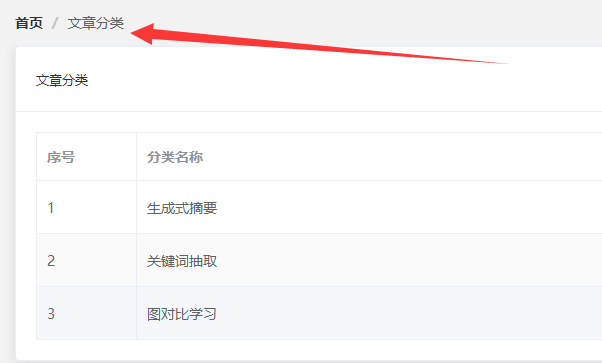
使用时 直接在template使用
示例:
1
2
3
4
5
6
| <ccc>
<el-breadcrumb separator="/">
<el-breadcrumb-item :to="{ path: '/' }">首页</el-breadcrumb-item>
<el-breadcrumb-item ><a href="/#/art-cate">文章分类</a></el-breadcrumb-item>
</el-breadcrumb>
</ccc>
|
展示如图:
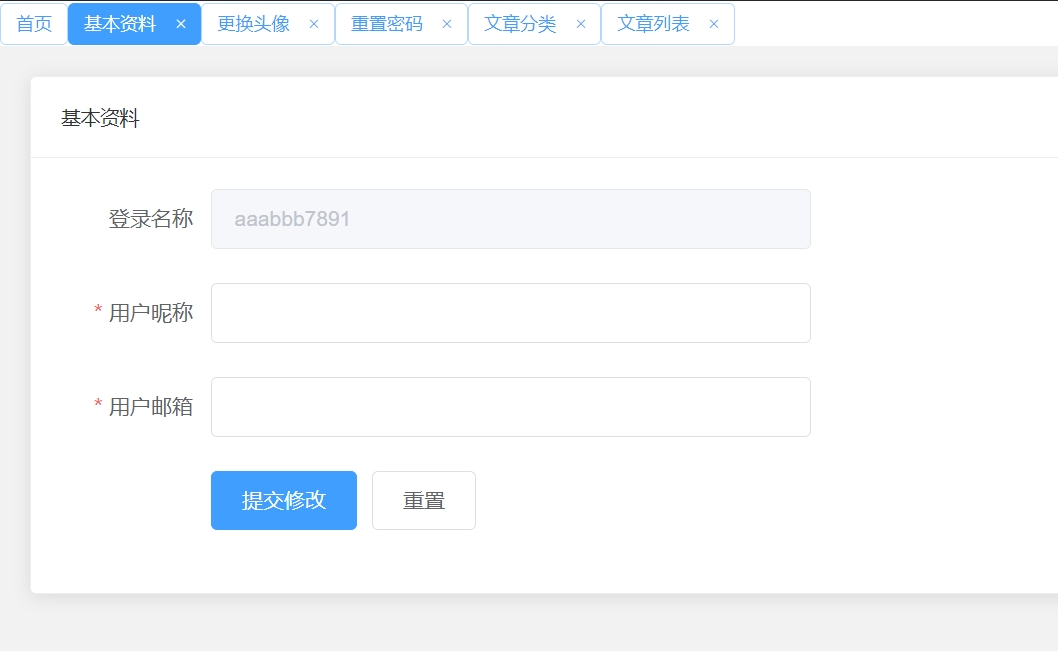
面包屑的使用:
定义组件 需要设置两种函数 点击函数和取消函数 来实现跳转和删除 同时需要展示vuex中存储的tabList数组
closable这边的定义为 除了首页不可以关闭 其他都可以关闭
effect这边定义为获取当前页面的meta数据中的title数据 通过该数据来判断是否要对按钮进行加粗处理
1
2
3
4
5
6
7
8
9
10
11
12
13
14
15
| <template>
<div id="app" class="grid-content ">
<el-tag
v-for="(item,index) in tags12"
:key="item.indexPath"
:closable="item.title !== '首页'"
:effect="$route.meta.title === item.title ? 'dark':'plain'"
@click = 'clickTags(item)'
@close = 'handleTag(item,index)'
size="small"
>
{{ item.title }}
</el-tag></div>
</template>
|
定义菜单栏的操作:
点击菜单栏执行函数:函数内容包括 执行跳转事件、vuex中的state.tabList更新数据
1
2
3
4
| toMenu (item) {
this.$router.push(item.path)
this.$store.commit('SELECTMENU', item)
},
|
1
2
3
4
5
6
7
8
9
10
11
| SELECTMENU (state, val) {
// 判断添加的数据是否为首页
if (val.name !== 'home') {
const index = state.tabList.findIndex(item => item.title === val.title)
// 当Index为-1时,表示tabList中没有,则可以添加面包屑
if (index === -1) {
console.log('push', val)
state.tabList.push(val)
}
}
}
|
其中
1
2
3
| clickTags (item) {
this.$router.push(item.indexPath)
},
|
1
2
3
4
5
6
7
8
9
10
11
12
13
14
15
16
17
18
19
|
handleTag (item, index) {
console.log(this.$route.meta.title)
this.closeTag(index)
const length = this.tags12.length
console.log('length', length)
console.log('tabList', this.$store.state.tabList)
if (index === length) {
this.$router.push(this.$store.state.tabList[length - 1].indexPath)
}
},
closeTag (index, val) {
console.log('indexaaa', index)
this.$store.state.tabList.splice(index, 1)
}
|
最终展示如下: